Top Apps
Shadowsocks
Cast for Chromecast & TV Cast
Liveuamap
AutoRemote
one sec | app blocker, focus
ZEFOY
MediaFire
Answer App - Coursology AI
Taski Opinion Reward Converter
Microsoft Translator
Dawn AI - Avatar Generator
Voice Access
CallApp: Caller ID & Block
Adblock Fast Browser Pro
Transcribe Speech to Text
Apps Zone
All Rights Reserved © Apps Zone 2025

Volume Booster - Sound Speaker
Enjoy Clear & Powerful Sound with Easy Audio Customization
iMediaStar
Review (4.8)
Reviews
+34K
Downloads
+1000K
Security
Safe

Advanced Audio Amplification Technologies in Modern Sound Booster Applications
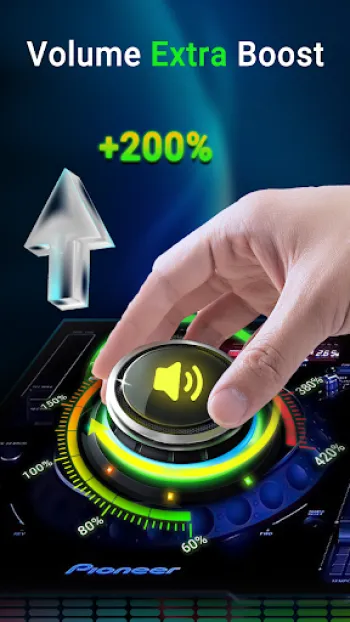
The field of audio amplification within mobile platforms has undergone significant transformations, driven by advances in software algorithms, hardware integration methods, and signal processing techniques. Within modern sound booster applications, the primary goal has evolved from merely increasing raw volume output to enhancing audio clarity, preserving fidelity, and optimizing soundstage experience regardless of the user’s physical environment or hardware configuration. These applications incorporate digital signal processing (DSP) frameworks that utilize complex algorithms such as dynamic range compression, equalization curves, and psychoacoustic enhancement, ensuring maximized loudness without distortion or damage to the hardware. Technically speaking, amplification beyond native system limits is achieved through software-driven gain control combined with frequency-specific adjustments to mitigate clipping and avoid peak overload. For instance, boosting bass frequencies requires selective amplification of low-frequency bands but demands simultaneous management of potential harmonic distortion that might affect adjacent frequencies or create undesirable resonance effects. In practice, sound booster apps like the Ultimate Sound Booster & Equalizer employ multi-band amplification strategies that split audio signals into frequency slices, apply tailored gain adjustments on each segment, and then recombine them. This technique not only increases loudness but also preserves audio fidelity by avoiding the conventional pitfalls of uniform gain boosts which often lead to sound muddiness or clipping. Additionally, these apps implement virtual surround sound algorithms and 3D spatialization techniques, creating a perception of depth and width beyond the physical speaker’s capabilities. The application’s DSP engine dynamically compensates for characteristics of headphones, external Bluetooth speakers, or built-in phone speakers, redefining the sound signature to maximize immersive listening. For example, integration of 3D virtualizer technology simulates amplitude and time delays between channels, recreating a more tangible stereo field even from mono sources. Given these intricacies, sound booster apps manage processor load and battery efficiency by harnessing specialized audio codecs and hardware acceleration when available, ensuring enhanced sound delivery without compromising device performance. The complexity of the audio pipeline includes realtime analysis modules that adjust sound parameters based on environmental noise, user-selected presets (such as rock, folk, jazz), and active media type, be it video, music, or voice communications. By employing sophisticated audio processing methods under optimized user interfaces, these platforms empower users to not just amplify sound but curate personalized auditory environments.
The Role of Equalizer Design and Frequency Band Customization in Audio Enhancement
Equalizers stand as one of the most critical components in refining audio output to match diverse auditory preferences and varied listening contexts, especially within mobile audio booster applications. The implementation of multi-band equalizers, such as those offering 5-band or 10-band adjustments, involves segmenting the entire audible frequency spectrum—roughly ranging from 20Hz to 20kHz—into discrete intervals that can be independently manipulated in real time. This precise frequency splitting allows for meticulous shaping of tonal characteristics; for example, adjusting the 31Hz-62Hz bands to amplify bass or fine-tuning the 4kHz-8kHz regions to enhance vocal clarity and instrumental shimmer. Technically, these bands operate as parametric or graphic filters, utilizing digital filters like finite impulse response (FIR) or infinite impulse response (IIR) algorithms that ensure minimal phase distortion and quick response times. Enhanced equalizer designs, such as those present in advanced applications, accommodate user profiles and presets such as "Rock," "Jazz," "Pop," and more, each reflecting predefined frequency curves scientifically calibrated to emphasize certain elements in the audio spectrum, adapting to genre-specific tonal demands. The ability to customize individual frequency gain levels allows audiophiles and casual users alike to sculpt sound profiles fitting personal tastes or compensating for acoustic environments, such as boosting midrange frequencies to counteract muffled speaker outputs in noisy surroundings. Beyond gain control, higher-end equalizers integrate features like Q-factor adjustments—controlling the bandwidth of each frequency band—allowing surgical precision when boosting or cutting specific frequencies without affecting neighboring bands. This is crucial for tackling resonances or feedback within headphone or speaker systems. Furthermore, equalizer algorithms work synergistically with bass boosters, where selective low-frequency amplification is balanced against potential distortion through dynamic range control, avoiding the bloated or "boomy" bass problem common in less sophisticated solutions. Some equalizers integrate psychoacoustic enhancement effects, subtly modifying phase relationships and harmonic content to enrich sounds perceptually without altering raw amplitude, thereby adding perceived warmth or brightness while mitigating listener fatigue. For maximum utility, these equalizers operate seamlessly in the background, maintaining user settings persistently, and provide real-time feedback through visualization spectrums which graphically display frequency response, helping users understand and fine-tune adjustments intuitively. In practical implementations, applications also optimize equalizer responsiveness with minimal latency and compatibility across various media players and streaming platforms, ensuring that audio enhancements remain consistent regardless of the source. Such comprehensive equalizer designs elevate audio playback from standard to immersive, empowering users to transform their everyday devices into portable high-fidelity sound systems capable of rivaling dedicated audio hardware.
Bass Boosting and 3D Virtualizer Technologies: Expanding Audio Dimensions
Bass boosting and 3D virtualizer technologies play pivotal roles in reshaping the auditory landscape by enriching low-frequency presence and simulating spatial sound effects that surpass the confinement of physical transducers. Bass boosting involves enhancing the amplitude of low-frequency sounds typically below 250Hz, which adds fullness and power to music or multimedia content. From a technical standpoint, this process must carefully control gain levels to prevent harmonic distortion or speaker damage, mandating the use of sophisticated dynamic equalization techniques combined with transient analyzers that adjust boost intensity depending on the input signal’s characteristics. The apps offering bass amplifiers incorporate filters that selectively target sub-bass and bass frequencies without excessive spillover into midrange sounds, preserving clarity and reducing muddiness. Meanwhile, the integration of 3D virtualizer technology dramatically alters spatial perception by applying binaural audio modeling and head-related transfer function (HRTF) principles, which mimic how human ears perceive sound directionality in the real world. By introducing minute delays, phase shifts, and amplitude modulations between stereo channels, these applications cause audio signals to appear as if emanating from specific points in a three-dimensional space around the listener. The effect creates an auditory illusion that enhances immersion, making individual instruments or vocals seem more distinct and positioned in depth and width, even when using standard stereo headphones. Technically, this involves advanced convolution algorithms that simulate environmental reverberation and reflections, thereby extending the perceived acoustic space. This, in turn, improves user experience across various content types—whether it is immersive movie watching, complex gaming audio environments, or nuanced music listening—by encouraging auditory focus and engagement. These technologies are paired with configurable parameters like surround effect intensity and virtualizer depth, enabling users to tailor the enhancements according to personal preference or hardware profile. Importantly, the successful implementation of such features in mobile applications requires efficient CPU utilization and platform-optimized code paths to minimize battery consumption and avoid latency issues that can disrupt sync between audio and video streams. The sound enhancement suite also typically includes automated calibration modes that assess the connected playback device, adjusting bass boost and 3D virtualizer settings dynamically to ensure optimal output tailored to headphones, built-in speakers, or Bluetooth audio devices. Consequently, bass boosters combined with spatial audio technologies present a powerful means to transcend physical hardware limitations, delivering rich, enveloping soundscapes from compact mobile devices without compromising fidelity or comfort, ideally suited for modern multimedia consumption habits.
User Interface Design and Experience for Intuitive Audio Customization
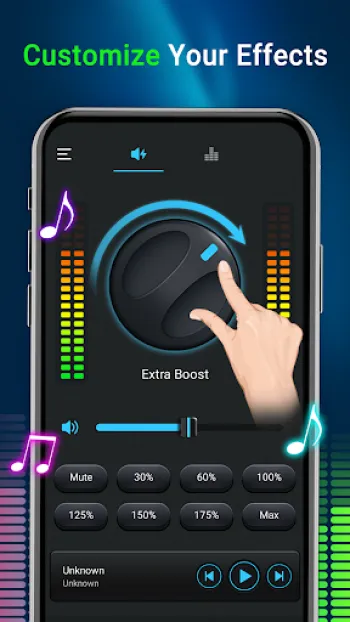
An essential aspect of advanced sound enhancement applications lies in their ability to deliver complex audio manipulation functionalities through user-friendly interfaces that invite intuitive operation without sacrificing depth or control. Designing such interfaces requires a thorough understanding of both technical audio principles and the diverse expertise levels of users ranging from novices to audiophiles. Optimal user experience (UX) in sound booster apps integrates visually appealing yet straightforward elements including sliders for volume and band equalizer adjustments, toggles for enabling bass boost or virtualizer effects, and graphical spectrum analyzers for real-time audio visualization. The challenge in interface design is managing the balance between offering extensive control—like 10-band equalizers with frequency labeling (e.g., 31Hz, 62Hz, 125Hz, etc.)—and preventing user overwhelm. Effective design approaches implement preset profiles categorized by musical genres or typical listening scenarios, providing immediate gratification for casual users while maintaining customizability for advanced users who prefer manual tweaking. Furthermore, the inclusion of handy widgets and notification controls enhances accessibility by allowing users to adjust sound parameters on the fly without reopening the main application interface. This multi-layered interaction model streamlines app usability during multitasking, such as adjusting volume during gaming or video playback, respecting user context and reducing friction. Visually, responsive and minimalistic layouts with contextual animations improve engagement and provide visual cues in response to user input, reinforcing control feedback and aiding understanding of changes being made. Additionally, color-coded equalizer bands and dynamic spectrum displays assist users in correlating adjustments with audible results. From a technical perspective, ensuring that these UI components synchronize seamlessly with underlying DSP modules involves asynchronous event handling to prevent audio glitches or latency while responding instantly to user commands. Modern architectures employ service-based backends, where audio processing continues even when the app runs in the background, further enriched by persistent notifications that grant volume or effect toggling without relaunching the app. This approach protects the continuity of the listening experience and respects user preferences. Importantly, the interface also includes safeguards and warnings, such as volume increment steps and risk advisories regarding excessive loudness, promoting responsible use to avoid hardware damage or hearing impairment. The fusion of such meticulous UI/UX engineering and robust backend functionality results in applications like Ultimate Sound Booster & Equalizer being accessible to broad audiences while delivering state-of-the-art audio customization capabilities traditionally reserved for high-end hardware.
Practical Integration, Compatibility, and Safe Usage Considerations in Volume Booster Apps
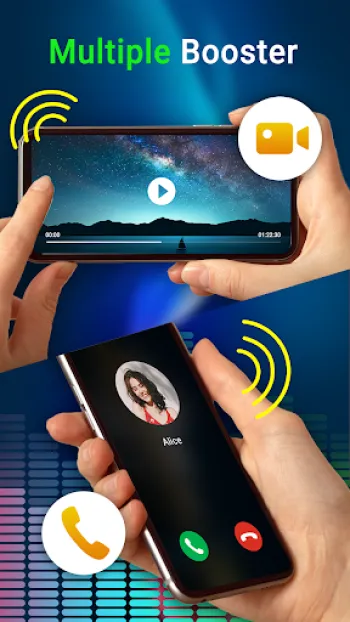
The effective deployment of volume booster and equalizer applications depends heavily on seamless integration with various mobile hardware configurations, software ecosystems, and user environments, alongside adherence to safe usage protocols. From a practical standpoint, these applications must interface compatibly with diverse Android versions and device manufacturers, as each may have distinct audio hardware architectures and firmware-driven sound policies. The app’s ability to access and modify system audio streams—media, call, notification volumes—and to enhance sound through software amplification without root privileges exemplifies refined implementation of Android AudioManager APIs and audio effects frameworks. Compatibility also extends to external playback peripherals such as wired headphones, wireless Bluetooth speakers, and megaphones, requiring adaptive DSP settings that detect playback type and dynamically adjust signal processing parameters to optimize output. For example, Bluetooth audio devices often impose compression and delay constraints that must be accounted for to maintain synchronous and distortion-free sound. Moreover, working within the OS’s permissions and coexistence with other audio control applications mandates sophisticated service designs; running as foreground services ensures that enhancements persist uninterrupted despite aggressive system task management. Regarding safety, sound booster apps carry inherent risks due to volume amplification beyond manufacturer-recommended limits, potentially leading to hardware damage or hearing loss. Hence, responsible applications implement graduated volume increases, warnings, and user acknowledgments, cautioning against sustained exposure to high sound levels. The integration of customizable volume step increments and the ability to monitor output levels numerically or visually enables users to find comfortable thresholds tailored to their hearing and context. From a user protection perspective, the app’s end-user license agreement and disclaimers clarify liability, emphasizing voluntary use at one's own risk. Technically, developers incorporate failsafe mechanisms such as peak limiters and dynamic range compressors to reduce the chance of signal clipping and speaker overload. Additionally, the app's background running mechanism ensures that audio effects remain continuously active without requiring persistent foreground operation, facilitated by established Android foreground service permission protocols. Such implementation guarantees uninterrupted sound customization while maintaining battery efficiency and system stability. From a content consumption angle, tailoring audio enhancements to media types like movies, games, or audiobooks involves heuristic signal analysis and preset selection to balance intelligibility, immersion, and listener fatigue. The app’s capacity to run invisibly yet intervene effectively in audio processing pipelines makes it a vital tool for users seeking enriched sound experiences across numerous domains. For users looking to harness these advantages, downloading the application from reliable sources ensures up-to-date support and security. The Download for Android is available for seamless installation and immediate audio enhancement with minimal setup effort, delivering both power and precision in portable sound amplification.
Share Your Opinion
Your Email Will Not Be Published.






















All Rights Reserved © Apps Zone 2025
Jason Newton
I have tried just about every eq/volume booster app that's on play store, and by far this one rates at one of the best I have tried in a long time,...
Shantel Leiws
I miss listening to my music that y'all for this volume booster 💕❤️
John k Baah
very good but some few adjustments
Kimberly Thomas
I like this app it was louder and smoother sounding
lyfe Azrin
This is the best volume booster I have ever used. I can use it to amplify the sound. This is so cool. It is suitable for use in the car and at part...